Save and Reuse Target Groups
Save frequently used Exhibitor or Attendee filters and reuse the same targeting criteria across events.
Written By Alex Mercer
Last updated 3 months ago
Last updated: July 31, 2026
Target Groups let you save frequently used Exhibitor or Attendee filters and reuse them across events. Instead of rebuilding the same qualification rules each time, you can select a saved group and immediately focus the current event view on the companies or people that match your criteria.
When to use a Target Group
Create a Target Group when you repeatedly work with the same:
Ideal customer profile or company characteristics.
Named-account criteria.
Industries, company sizes, locations, or funding stages.
Job titles, departments, management levels, or contact locations.
Other combinations of filters available in the current Exhibitors or Attendees view.
Target Groups are especially useful when comparing the same audience profile across multiple events.
Save a Target Group
Open an event and go to Exhibitors or Attendees.
Apply the filters you want to reuse.
Open the Target Group menu.
Select Save as new.
Enter a clear name, then save the group.
Use a name that describes the audience rather than the event, such as US Enterprise Marketing Leaders or Biotech Exhibitors, when you plan to reuse the group across events.
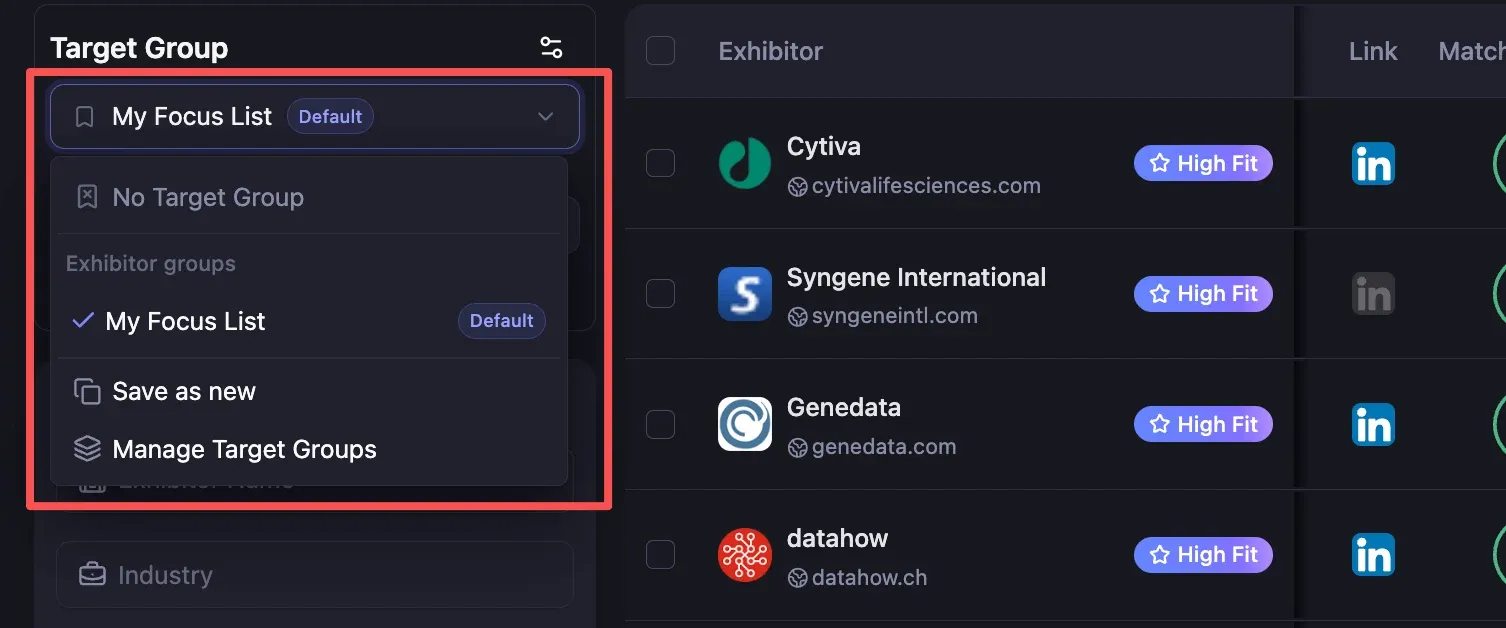
Apply a saved Target Group
Open the Target Group menu and select the group you want to use. Lensmor applies the saved filter criteria to the current compatible event view.
The menu organizes saved groups for the current view, such as Exhibitor groups. If the event has no records matching the saved criteria, the result can be empty even though the event contains other companies or people.
Understand the menu options
No Target Group: Review the current event without an active saved group.
Default: Identifies your primary saved group in the menu. Check the active selection rather than assuming it is applied in every workflow.
Save as new: Save the current filter combination as another reusable group.
Manage Target Groups: Review saved groups and the management options currently available to your account.
Before taking a bulk action
Always confirm the active Target Group, visible filters, and resulting row count before you enrich contacts, generate outreach, or export.
A Target Group saves filter criteria. It does not:
Unlock an event or Visitor data.
Reveal hidden email addresses or phone numbers.
Change your plan, access level, or Credit requirements for paid actions.
Guarantee that matching records exist for every event.
If the result is narrower than expected, select No Target Group, review the full available list, and then apply or adjust filters deliberately.
Was this helpful?
Still need help? Share an idea