Unlock an Event
Compare Event Access and Full Access, then unlock exhibitors, public-signal attendees, and available Visitors.
Written By Alex Mercer
Last updated 3 months ago
Last updated: July 24, 2026
Unlock an event when you need more than the limited preview of its exhibitor or attendee intelligence.
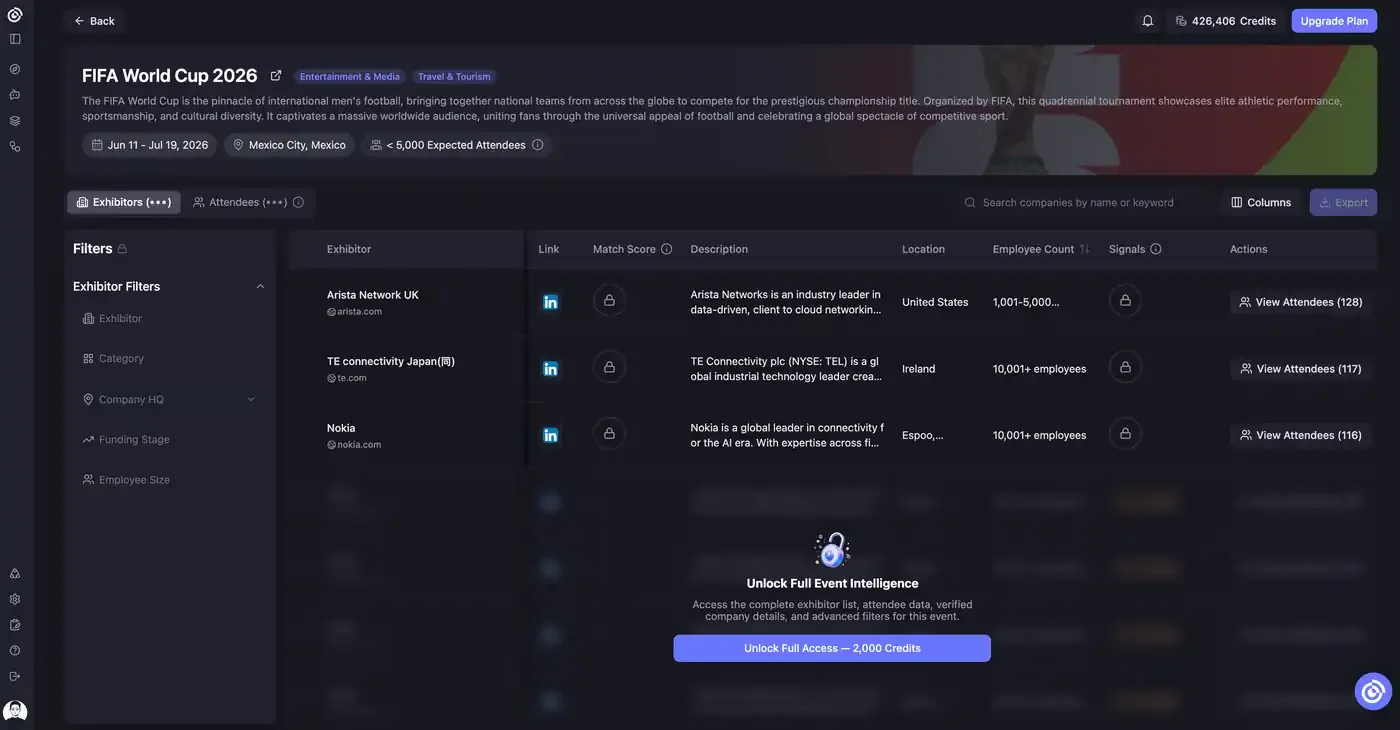
Before you unlock an event, Lensmor shows a limited preview. You can preview the first three rows when data is available, while the rest of the exhibitor or attendee list stays locked or blurred.
Lensmor offers two access levels when Visitor Intelligence is available:
- Event Access unlocks exhibitors and public-signal attendees.
- Full Access adds Visitors provided by Event Organizers and Data Partners.
Visitor records are Lensmor's highest-value attendee source because they provide a more direct view of the event audience than public signals alone. Visitor coverage varies by event.
Compare access levels
Full Access and the Visitor upgrade require an active paid subscription. Lensmor only shows the Visitor option when Visitor data is available for that event.
Both access levels remove the three-row preview limit for the sources they include. They also include later updates to those sources for the same event.
What still requires separate enrich or generate actions
Event Access and Full Access do not automatically reveal or generate every contact-level field.
These actions are separate:
- Reveal email addresses.
- Reveal phone numbers.
- Unlock LinkedIn activity.
- Generate connection or outreach messages.
Use the enrich and generation workflows after unlocking the event and selecting the contacts you want to work with.
Unlock a new event
- Open an event from Discover, Agent results, or another Lensmor workflow.
- Review the event summary and preview data.
- Select Unlock Event Access for exhibitors and public-signal attendees, or select Unlock Full Access when you also need available Visitors.
- Review the included sources, Credit cost, and your remaining balance.
- Confirm the access level you selected.
- Use the Exhibitors and Attendees tabs to filter, select, enrich, generate outreach, or export the sources included in your access.
Add Visitors after Event Access
If you already unlocked Event Access and the event has Visitor data:
- Open the event and go to Attendees.
- Select Unlock Visitors.
- Review the 3,000 Credit cost and your remaining balance.
- Confirm the unlock.
Your total spend for the event becomes 5,000 Credits: 2,000 Credits for Event Access plus 3,000 Credits for the Visitor upgrade.
After unlocking
The unlocked event remains available in your workspace. If Lensmor adds new data for the sources included in your access level, those updates remain available under the same unlock.
After unlock, you can use filters, columns, selection, export, and attendee workflows on the available sources. Visitor identities and Visitor export remain locked until you have Full Access. Contact enrichment and message generation still run as separate actions.
When not to unlock yet
Do not unlock an event until you have confirmed that:
- The event is relevant to your GTM motion.
- The preview data and available source types match your target audience.
- You have chosen Event Access or Full Access based on whether you need Visitors.
- Your team is ready to use the data for research, outreach, or export.
Was this helpful?
Still need help? Share an idea